Delete my account
To delete your access, first log in to the Echometer app: https://my.echometerapp.com/
Tips
- If you do not know which email address you used to create your account, check your email inbox to see which email address you received the Echometer notifications. Use this email address for login.
- If you no longer have access to your password, click on “Request login link”. You will then receive an email with a link that logs you directly into Echometer.
Once you are logged in, click on your name in the top left corner and then click “Account Settings”:

Scroll down in the account settings to the “Danger Zone” and click on “Delete Account”:
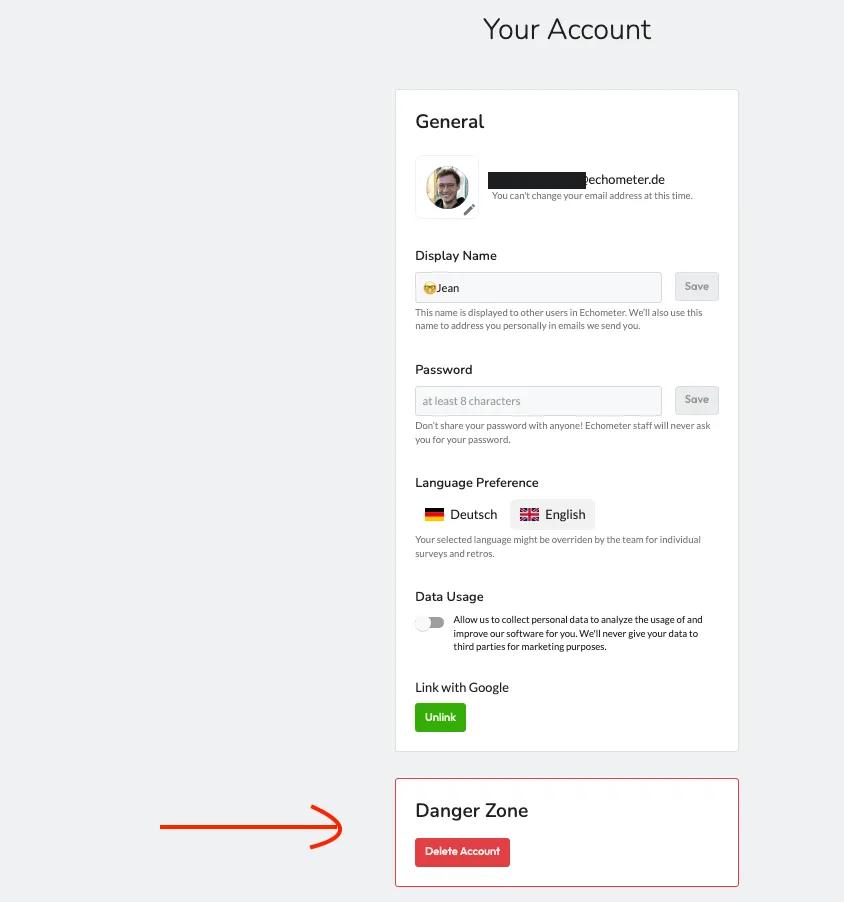
To confirm the deletion, you will be asked to enter your password again.
Can I delete my account if no password is set?
Yes. If you don’t have a password, or don’t know it, you can simply set a new password under “Password” in the account settings and use it directly to confirm the deletion of the account.
If you have problems with deleting your account, please contact us via support [at] echometer.com.